How to Block VPN Users on Your Website
Chapters
Chapters
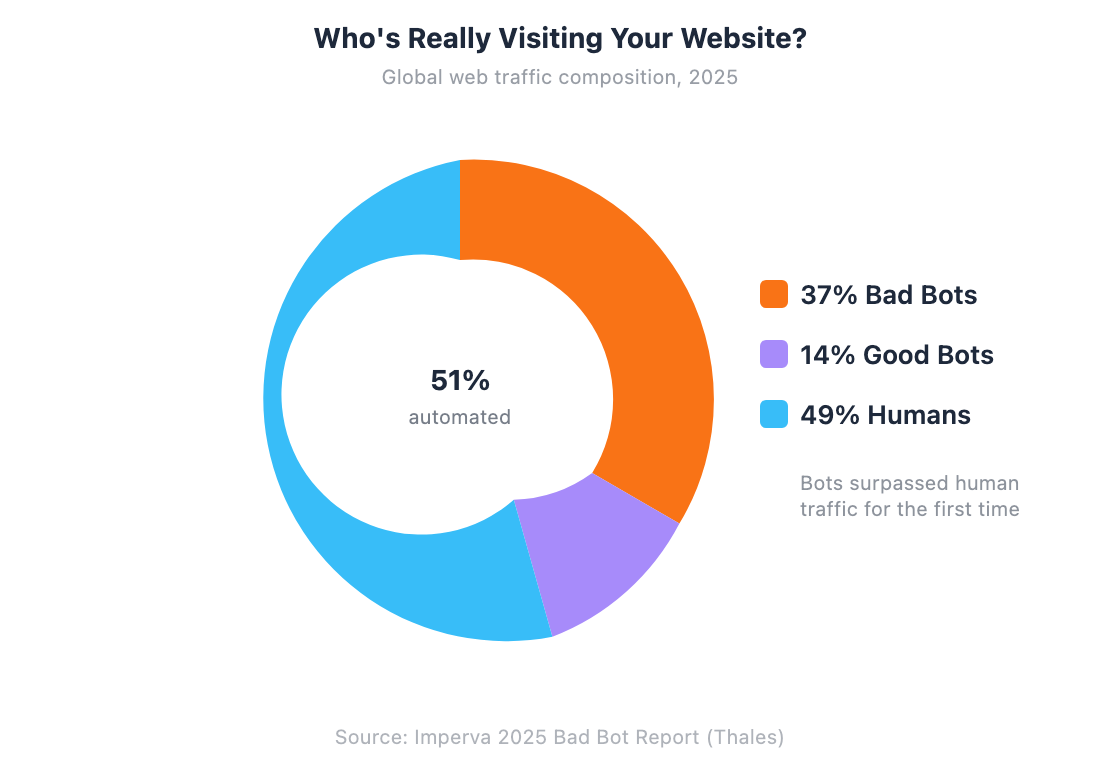
Bad bots now account for 37% of all internet traffic — and for the first time in a decade, automated traffic has surpassed human visitors at 51% of the total (Imperva, 2025). A significant chunk of that malicious traffic hides behind VPNs and proxies to bypass security measures. If you’re running a website that handles payments, serves region-locked content, or fights fraud, knowing how to detect and block VPN users isn’t optional anymore.
But here’s the nuance: 1.75 billion people use VPNs globally, and most of them are legitimate customers (Security.org, 2026). Blocking all VPN traffic is like locking your front door and bricking the windows. This guide covers when VPN blocking makes sense, how detection actually works, and the methods that let you target bad actors without alienating real users. You can test any IP right now with our VPN and proxy detector.
TL;DR: Block VPN users selectively, not universally. Use VPN detection APIs (95-99.9% accuracy) to flag suspicious traffic, then apply risk-based rules: CAPTCHAs for VPN users, hard blocks only for high-risk actions. E-commerce fraud hit $48 billion in 2025 (Juniper Research), but blanket VPN blocking alienates 42% of US internet users who use VPNs legitimately.
Why Would You Want to Block VPN Users?
Global e-commerce fraud losses reached $48 billion in 2025 — a 16% increase year-over-year — with cumulative online payment fraud projected to exceed $362 billion between 2023 and 2028 (Juniper Research, 2024). Fraudsters use VPNs to mask their real location, bypass geographic restrictions, and make their activity harder to trace. That’s the primary reason businesses care about VPN detection.
Ad fraud is another major driver. Over 20% of all ad traffic is invalid, based on analysis of 105.7 billion impressions throughout 2025 (Fraudlogix, 2026). Click farms and ad fraud bots routinely use VPNs to rotate their IP addresses, making each fake click appear to come from a different location. If you’re running paid advertising, that’s real money evaporating.
Geo-restriction enforcement is the third common use case. About 46% of personal VPN users admit to using VPNs specifically to access streaming services, with 26% targeting region-locked content (DemandSage, 2026). If your business has licensing agreements tied to geography — streaming, gambling, financial services — you’re contractually obligated to enforce those restrictions.
Account takeover attacks surged 40% in 2024, with 44% of advanced bot traffic specifically targeting APIs (Imperva, 2025). Attackers use VPNs to credential-stuff from rotating IPs, making rate limiting by IP address nearly useless. You can check whether a suspicious IP has been flagged with our IP reputation checker.
How Does VPN Detection Actually Work?
VPN detection APIs now achieve 95-99.9% accuracy in identifying VPN and proxy connections, depending on the provider and method (IPQS, 2025). But how? There’s no single magic check — effective detection combines multiple signals.
The primary method is IP database matching. Security companies maintain databases of known VPN server IP ranges, datacenter addresses, and proxy networks. When a visitor connects, their IP gets checked against these lists. Our VPN and proxy detector uses this approach, cross-referencing multiple databases including commercial VPN providers, Tor exit nodes, and datacenter IP ranges.
ASN (Autonomous System Number) analysis adds another layer. Residential ISPs have different ASN profiles than datacenters. If someone claims to be browsing from a home connection but their IP belongs to AWS or DigitalOcean, that’s a red flag. An ASN lookup reveals whether an IP belongs to a hosting provider, which is a strong indicator of VPN or proxy usage.
More advanced detection includes DNS leak checks (where the DNS resolver doesn’t match the VPN’s claimed location), WebRTC leak detection (browser APIs that can expose the real IP behind a VPN), and behavioral analysis (connection patterns that don’t match typical residential usage). The 21% of bot attacks that now use residential proxies make this last point critical — traditional datacenter-based detection alone isn’t enough anymore (Imperva, 2025).
What Are the Best Methods to Block VPN Traffic?
Fifty-six percent of organizations experienced VPN-exploited security breaches, and 92% worry that VPNs expose them to ransomware attacks (Zscaler ThreatLabz, 2025). Here are five methods to detect and block VPN users, ranked from simplest to most comprehensive.
Method 1: VPN detection API. The most straightforward approach. Services like IPQualityScore, IPinfo, and myiphelp’s API accept an IP address and return a verdict: VPN, proxy, Tor, datacenter, or residential. You make a server-side API call on each request and act on the result. Most offer free tiers for low-volume sites. Our VPN and proxy detector lets you test this before committing to an API.
Method 2: IP reputation databases. Services like AbuseIPDB, Spamhaus, and Project Honey Pot maintain community-driven blocklists. You can query these during authentication or checkout to flag known-bad IPs. Check any IP against multiple blocklists simultaneously with our IP blacklist checker.
Method 3: DNS-based blocklists (DNSBL). Similar to email spam filtering. Your server queries a DNS blocklist with the visitor’s IP. If it resolves, the IP is flagged. Lightweight and fast, but limited to whatever the list maintainer tracks.
Method 4: Firewall rules on datacenter ASNs. Block or challenge traffic from known hosting providers at the network level. This catches the majority of cheap VPN services since they run on cloud infrastructure. Won’t catch residential proxies, but it handles the bulk of obvious VPN traffic. An ASN lookup helps you identify which ASNs to target.
Method 5: Browser fingerprinting + IP cross-check. The most advanced approach. Combine IP-based detection with browser fingerprinting to identify users even when they switch VPN servers. If the same browser fingerprint appears from 15 different countries in an hour, that’s not a globetrotter — it’s a fraudster. This requires client-side JavaScript and server-side correlation.
How Should You Implement VPN Detection?
Sixty-five percent of enterprises plan to replace traditional VPN services within one year — a 23% increase from the prior year — because VPNs have become as much a security risk as a protection tool (Zscaler, 2025). For website operators, the implementation question isn’t whether to detect VPNs, but how aggressively to respond.
Server-side detection is non-negotiable. Client-side JavaScript checks can be bypassed by disabling JS or using browser extensions. Always validate the IP on your server before trusting any client-side signal. Make the API call early in the request lifecycle — before rendering expensive pages or processing form submissions.
Use a tiered response, not a binary block. Rather than showing a blank “Access Denied” page, consider graduated responses: show a CAPTCHA for VPN users browsing content, require phone verification for VPN users at checkout, and hard-block VPN users only for high-risk actions like account creation with a disposable email. This preserves the experience for legitimate VPN users while raising the bar for fraudsters.
Cache detection results. You don’t need to query a VPN detection API on every single page load. Cache the result for the session or for 15-30 minutes. This reduces API costs and latency. Most VPN IPs don’t change mid-session.
Log and monitor before hard-blocking. Run VPN detection in monitoring mode for a week or two before enforcing blocks. Check what percentage of your traffic is flagged — if it’s 40%, you’ve got a calibration problem, not a fraud problem. Use our security header scanner to verify your site’s security posture while you’re at it.
Should You Block All VPN Users?
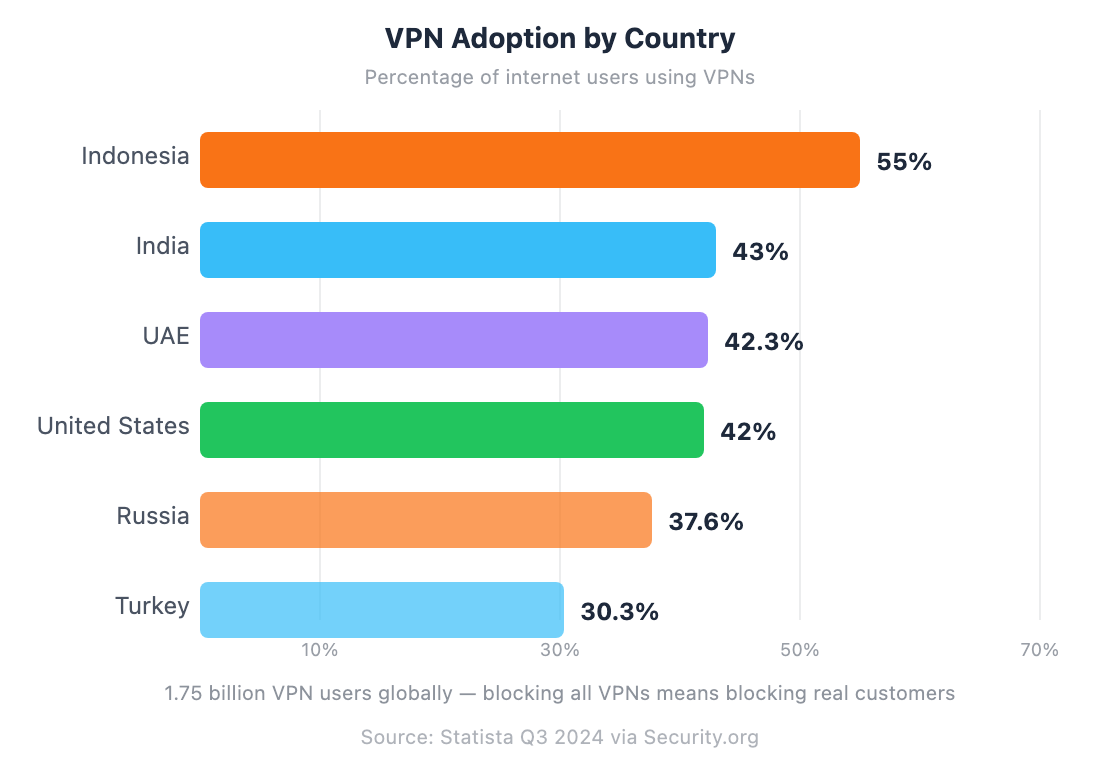
In the United States alone, 42% of internet users rely on VPNs — that’s nearly half your potential audience (Security.org, 2026). Blocking all VPN traffic means turning away legitimate customers who use VPNs for perfectly valid reasons: privacy on public Wi-Fi, corporate security policies, or living in countries with internet censorship.
There are also legal considerations. GDPR and similar privacy regulations give users the right to protect their data, and VPNs are a legitimate tool for doing so. Blanket VPN blocking in the EU could raise compliance questions, especially if you can’t demonstrate that the block serves a proportionate security purpose.
The smarter approach is risk scoring. Instead of a binary VPN = blocked decision, assign a risk score based on multiple factors: is the IP a known VPN? Is the user’s behavior suspicious? Does the geolocation match their account history? Does the browser fingerprint match previous sessions? A VPN user with consistent behavior and a verified account is very different from a new visitor on a VPN making their first purchase with a stolen credit card.
Run a quick check on any IP with our IP lookup tool to see its threat score, VPN status, and geolocation — the kind of data that feeds a risk-scoring system.
Frequently Asked Questions
Can I detect if someone is using a VPN on my website?
Yes. VPN detection APIs compare visitor IPs against databases of known VPN servers, datacenter ranges, and proxy networks. Accuracy ranges from 95% to 99.9% depending on the provider. You can test this instantly with our VPN and proxy detector — enter any IP address and it shows whether it’s a VPN, proxy, Tor exit node, or datacenter IP.
Is it legal to block VPN users from my website?
Generally yes — website operators have broad discretion over who they serve. Streaming services, gambling sites, and financial platforms routinely block VPN users to enforce licensing and compliance requirements. However, consider GDPR implications in the EU, where users have strong privacy rights. Blocking VPN users for no clear business reason could draw scrutiny if challenged.
Will blocking VPNs hurt my legitimate traffic?
It can. With 42% of US internet users on VPNs and 55% in Indonesia, blanket blocking removes a significant chunk of potential visitors. That’s why risk-based approaches work better — challenge VPN users with CAPTCHAs instead of hard blocks, and only restrict VPN access for high-risk actions like payments or account creation.
What’s the difference between a VPN and a proxy?
A VPN encrypts all traffic from your device and routes it through a remote server, changing your visible IP address. A proxy only routes traffic from a specific application (usually a browser) and may not encrypt it. Both mask the user’s real IP, but VPNs offer broader protection. From a detection standpoint, both show up as non-residential IPs and are flagged by similar methods. Our IP lookup distinguishes between VPN, proxy, Tor, and datacenter traffic.
How accurate is VPN detection in 2026?
Commercial VPN detection APIs report 95-99.9% accuracy for known VPN providers and datacenter IPs. The challenge is residential proxies — real home IP addresses rented out for traffic routing. These are harder to detect since they look like normal residential connections. Imperva found that 21% of bot attacks now use residential proxies, which is why combining IP detection with behavioral analysis gives the best results.
The Right Approach to VPN Blocking
VPN blocking isn’t about shutting everyone out. It’s about making informed decisions with good data. The best implementations detect VPN usage as one signal among many, then respond proportionally based on the risk level of what the user is trying to do.
- Detect first, block selectively — use VPN detection APIs for accurate identification, then apply rules based on context
- Tier your response — CAPTCHAs for browsing, phone verification for purchases, hard blocks only for the highest-risk actions
- Monitor before enforcing — run detection in logging mode to understand your traffic before you start blocking
Start by checking your own traffic. Our VPN and proxy detector lets you test any IP address for free, showing VPN status, proxy type, datacenter detection, and threat score. Combine that with our IP lookup for the full picture — geolocation, ISP, ASN, and security flags in one query.